

3D or 2D Explainer Video: Which Technique Fits Which Product
3D or 2D explainer videowhich technique fits which product — and where the line runs
This is not a question about budget, and not a question about style. It is a question about what you are showing.
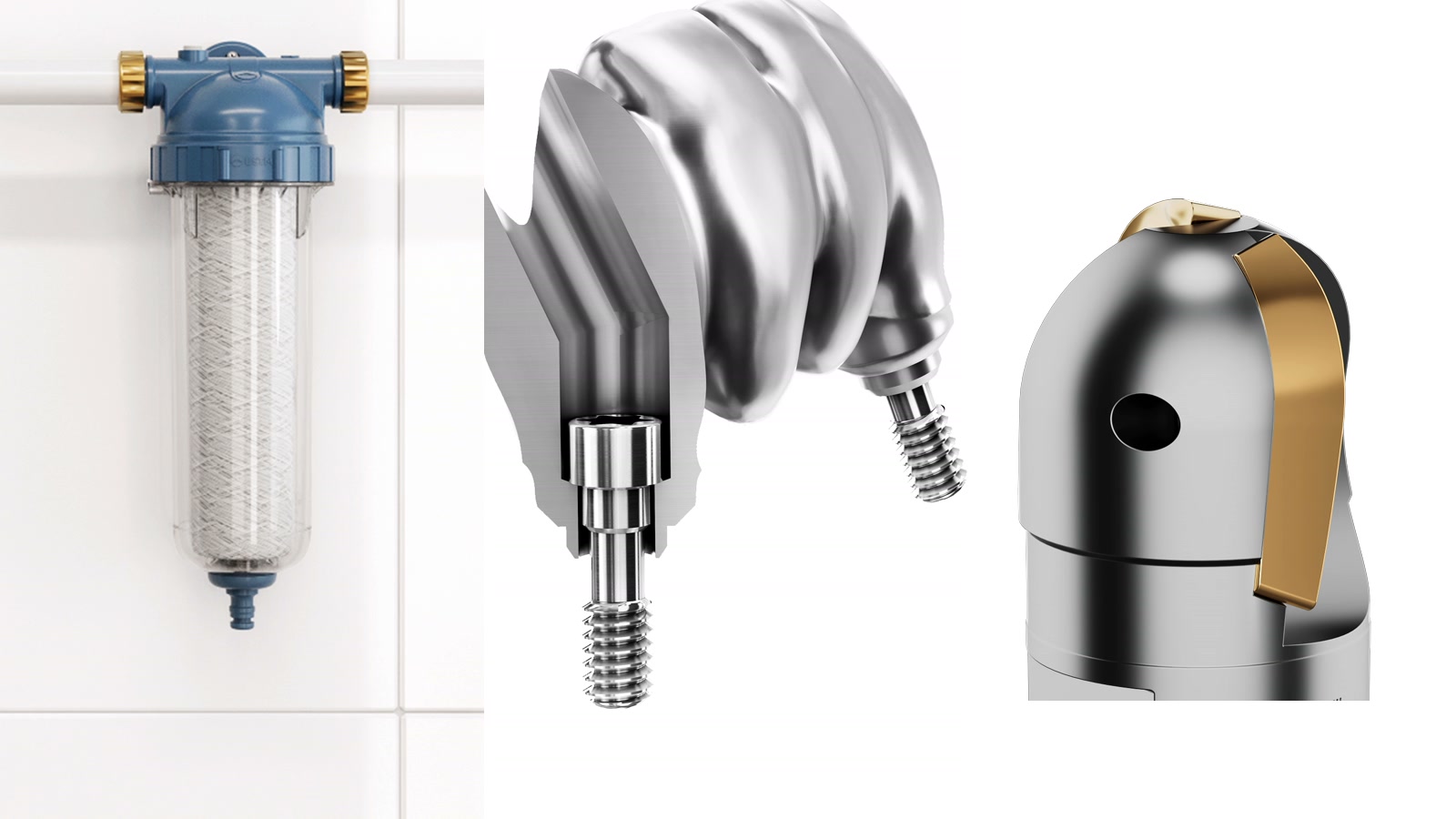
Exploded views built from 3D models — shots from Modelight projects.
In short: the choice between 2D and 3D animation is not about budget or taste, it is about the subject. If you are explaining a service, a process or an idea, 2D is faster and entirely sufficient. If you have to show an object that physically exists, with an inside, an assembly order and tolerances, 2D starts guessing where 3D reconstructs. The line runs exactly where a drawing stops being a metaphor and starts being documentation.
What an explainer video actually is
An explainer is a short film with a single job: to make the viewer understand how something works. It does not sell directly, it does not build a mood and it does not try to impress — it explains. It usually runs from under a minute to about three, and it answers one specific question: what is this, and why does it work the way it does.
Two schools dominate. The first is 2D animation — drawing, flat shapes, simplified characters and icons. The second is 3D animation — a spatial model of the object, with lighting, materials and a camera that moves around it and through its interior.
The 2D-or-3D question usually comes up at the brief stage, and it usually comes up wrong. It sounds like a question about style or about money, when it is really a question about the object. Below is the criterion we use ourselves, with the line drawn honestly — a large share of subjects genuinely does not need a third dimension.
If your question is not about technique but about which kind of film to commission in the first place, we covered that separately in the piece on which 3D video format belongs at which stage of a B2B sale.
When 2D is entirely enough
2D animation is excellent everywhere there is nothing to look at. That sounds contrary, but it is the shortest description of its strength.
It works when you are explaining a service — insurance, leasing, a billing model. It works when the process happens between people and documents rather than between machine parts. It works for apps and platforms, because the interface is flat anyway. It works when you need a metaphor: a rising chart, a flow of data, a map of a market. And it works when you want a light, friendly tone that a technical render will not deliver.
In those cases, moving the subject into 3D not only raises the cost, it usually hurts — it adds weight where simplicity was the point. We talk clients out of 3D every time we can see the story can be told with a drawing.
When 2D stops being enough
The line is crossed the moment the film has to show a specific object that exists, or is about to, and show it well enough for someone to make a decision or perform a task.
That is where 2D starts guessing. The illustrator draws a heat exchanger approximately, because there is no access to the geometry. The cross-section becomes symbolic — a single line stands in for dozens of plates at a defined pitch. The assembly order gets simplified, because the real one is too intricate for a flat drawing. And when the client changes a product version, the whole thing has to be redrawn.
In 3D something entirely different happens. We start from a model, most often straight from the CAD file — the same one the product is manufactured from. The geometry is real rather than illustrated. A cross-section is an actual cut through a solid, not an impression of one. The camera can go inside the device, because that inside genuinely exists. And the part that matters most over time: the model is built once and then serves further shots, colour variants, new versions and additional channels.
There is one more situation where 3D has no alternative: the product does not exist yet. The model is ready before the first prototype, so marketing and instructional materials can be produced alongside manufacturing instead of after it.
The two techniques side by side
The comparison below is not meant to crown a winner. It is meant to help you recognise which side of the line your subject sits on.
| 2D animation | 3D animation from CAD | |
|---|---|---|
| What you are showing | A process, a service, an idea, data | A physical object and its interior |
| Where the shape comes from | The illustrator's imagination | Your CAD file, matching production |
| Cross-sections and interiors | Symbolic, drawn | Real geometry and real intersections |
| A new product version | Has to be redrawn | Swap the model, the scene stays |
| Assembly order | Has to be simplified | Reproduced exactly as it happens |
| Before a prototype exists | The illustrator guesses | The model precedes the product |
| Materials and finishes | Suggested with colour | Metal, glass and plastic with real reflections |
| Multiple languages | Usually redrawing the captions | Same picture, swap voice-over and captions |
Not sure which technique fits your product?
Send a CAD file or a few photographs. We will tell you plainly what 3D can show, and where a simpler form is entirely enough.
Tell us about your productbiuro@modelight.pl | +48 509 510 197
The manual nobody reads
There is one use of an explainer that comes up least often in budget conversations and pays for itself fastest: replacing the manual.
Start with the thing everyone suspects and someone actually measured. A team at Queensland University of Technology spent seven years studying how people use product documentation. The conclusion, published in Interacting with Computers in 2016, was pointed enough that the work received an Ig Nobel Prize in literature: most users of complex products simply do not read the instructions. The study looked at consumer products rather than industrial machinery — but anyone who has run a service desk knows the mechanism is the same.
The other side of that equation has been measured too. Researchers from Stanford and Microsoft Research tested what happens when assembly instructions are designed according to how people actually process images: the right order of steps, one unambiguous viewpoint, and clear highlighting of the part being added.
What a well-designed visual instruction delivers
Results measured against factory-issued and hand-drawn instructions. Faster assembly and fewer mistakes translate directly into fewer service calls and fewer complaints.
To be fair: that study covered furniture assembly and dates from 2004, so we do not transfer it directly onto servicing a heat pump. It does show a direction, and every client who has rolled out an instructional animation confirms it.
In this application animation has an advantage paper cannot match. It shows movement, so nobody has to reconstruct it from a sequence of stills. It shows the inside of the device at the moment when the technician’s own hand is blocking the view. It requires no reading, so it crosses the language barrier — which matters both for export and on site. And it is available where the work actually happens: behind a QR code on the housing or the packaging, rather than in a binder in the office.
For a non-technical audience the gap is wider still. A manual written by an engineer assumes knowledge the end customer does not have. An animation assumes nothing — it simply shows.
Replacing a water filter cartridge, step by step. This one piece replaces a dozen drawings in the manual and works in any language. Produced for USTM.
Four examples from a 3D studio
Showing behaviour you cannot see
A Mocek pellet burner operates inside a sealed chamber. A customer can read a description of how fuel feed control works — or watch the full cycle in a matter of seconds. The animation shows what even a service technician will not see with the unit open.
Showing an installation performed by someone else
USTM water filters are fitted by an installer or by the user, often with no technical background. The installation animation walks through each step, shows valve positions and flow direction, and quietly removes a share of the calls the service desk would otherwise take.
Showing flow inside a sealed body
With a Hexonic heat exchanger, the entire value of the product lies in how the media are routed inside. A photograph shows a metal box. A 3D cross-section shows the reason this exchanger outperforms a cheaper one.
Showing a mechanism hidden inside a housing
In medical devices, a needle-safety mechanism fires in a fraction of a second and entirely inside the plastic body. A camera will not register it, and staging it with a patient is out of the question. What remains is medical 3D animation — and that is what ends up in training materials for clinical staff.
All four have one thing in common: done in 2D, each would have produced a drawing of something an illustrator imagined. Here the subject was a specific device made by a specific manufacturer.
Four products, four different reasons to reach for 3D
Click a tile to enlarge. Every one of these images came from a model, not from a photograph.
What you get by choosing a model over a drawing
The points below are not marketing promises. They are consequences of the fact that the work starts from geometry rather than from an impression.
Five things a 3D model gives you
Each one follows directly from the model being a reproduction of the product rather than an illustration of it.
- Consistency with productionThe geometry comes from the same file the product is made from, so nothing on screen is absent from reality.
- One source, many deliverablesOne model yields a trade-show film, an instructional sequence, catalogue visuals and product-page graphics.
- Variants without redoing the workA new colour, another version or an added module is a swap inside the scene, not a new project.
- Materials before launchA campaign can be ready before the first unit leaves the line, because the model precedes the prototype.
- One picture, many languagesA foreign-language version means swapping voice-over and captions, not redrawing the animation.
- Fewer questions for the service deskShowing assembly order and part positions removes a share of the calls before they happen.
A Mocek pellet burner — the full working cycle shown from the inside of a sealed chamber. Produced for a manufacturer of solid-fuel boilers.
Five questions that settle it
Before commissioning any film, answer five questions. Four answers pointing at the first column mean 2D will do and there is no reason to pay more.
- Is what I am showing an object, or a concept? If a concept, choose 2D. If an object, read on.
- Does the viewer need to see the inside or a cross-section? If so, a drawing will only ever be somebody’s impression.
- Does the geometry have to match reality? For assembly, servicing and technical documentation, it must.
- Will there be further versions, variants or languages? If so, a 3D model pays for itself by the second deliverable.
- Does the product already exist? If not, 3D is the only way to show it before launch.
There is one rule we repeat to clients more often than any other: one film rarely covers every need at once. A trade-show piece, a product-page film and a service animation differ in length, pace and audience. With 3D that is not a problem, because the expensive step — the model — happens only once.
More on what an instructional film can actually explain is on our page about explainer video and instructional 3D animation. If you are curious about how such an animation is produced, we described the process step by step in how 3D animation is made. And if the subject is a machine rather than a consumer product, the technical animation page covers that side of the work.
Got a product that cannot be photographed?
See how we solve exactly that for machine builders, medtech companies and industrial manufacturers. A technical 3D animation studio working since 2008.
See explainer and instructional 3Dbiuro@modelight.pl | +48 509 510 197
Frequently asked questions
Is a 3D explainer always more expensive than 2D?
For the first film, usually yes, because the model has to be built. But that model is built once and keeps working — a second film, a different camera angle, a colour variant or a new product version does not start from zero. If you need one short film about a service, 2D is often the sensible choice. If you are planning a series of materials about a physical product, the arithmetic flips faster than most people expect.
Do I need a CAD file to make a 3D explainer?
It is the most convenient route, and it means the geometry on screen matches the geometry in production down to the millimetre. It is not a hard requirement — we can build the model from technical drawings, photographs and dimensions. CAD shortens the work and removes the risk of discrepancies, but the lack of it does not close the subject.
Can an animation replace the manual in our documentation?
It does not replace documentation required by regulation — that stays as it is. What it replaces is the moment when a person is actually assembling or servicing the device and, instead of reading, looks. In practice the strongest setup is both: the manual in the documentation, and the animation available from a QR code on the device or the packaging.
How long does a 3D explainer take to produce?
It depends almost entirely on whether the model already exists. With a CAD file and an approved script, a short instructional piece takes a couple of weeks of working days. Modelling from scratch, several product variants or multiple language versions extend that, which is why we start the conversation with the material rather than the deadline.
Will one film cover every channel?
Rarely. A trade-show loop, a product-page film and a service animation differ in length, pace and audience. The good news is that several deliverables come out of one 3D model without repeating the expensive step. That is precisely the advantage 2D does not offer.