The full B2B production pipeline — from the first briefing call to the final MP4. What marketing managers and engineers should know before commissioning a 3D animation for their product.
Marketing managers often ask us the same question after we quote: "What does 3D animation production actually involve? Why does it take this long?" It's a fair question. From the outside, 3D looks like "someone clicks a button and Blender does the rest." From the inside, it's a pipeline that looks more like film production than graphic design — with all the same phases, approvals, and render-time realities.
By the end of this article, you'll know why the animatic stage is the most important moment of the project, and why CAD files on day one are worth more than any revision round later.
Every professional 3D project, whether it's a 15-second product loop or a 3-minute explainer film, moves through these four phases in order. The proportion of time spent in each depends on complexity, but the order never changes.
The briefing, scoping, and creative direction phase. Nothing is rendered yet. The studio is trying to understand exactly what the animation needs to communicate, to whom, and where it will be shown.
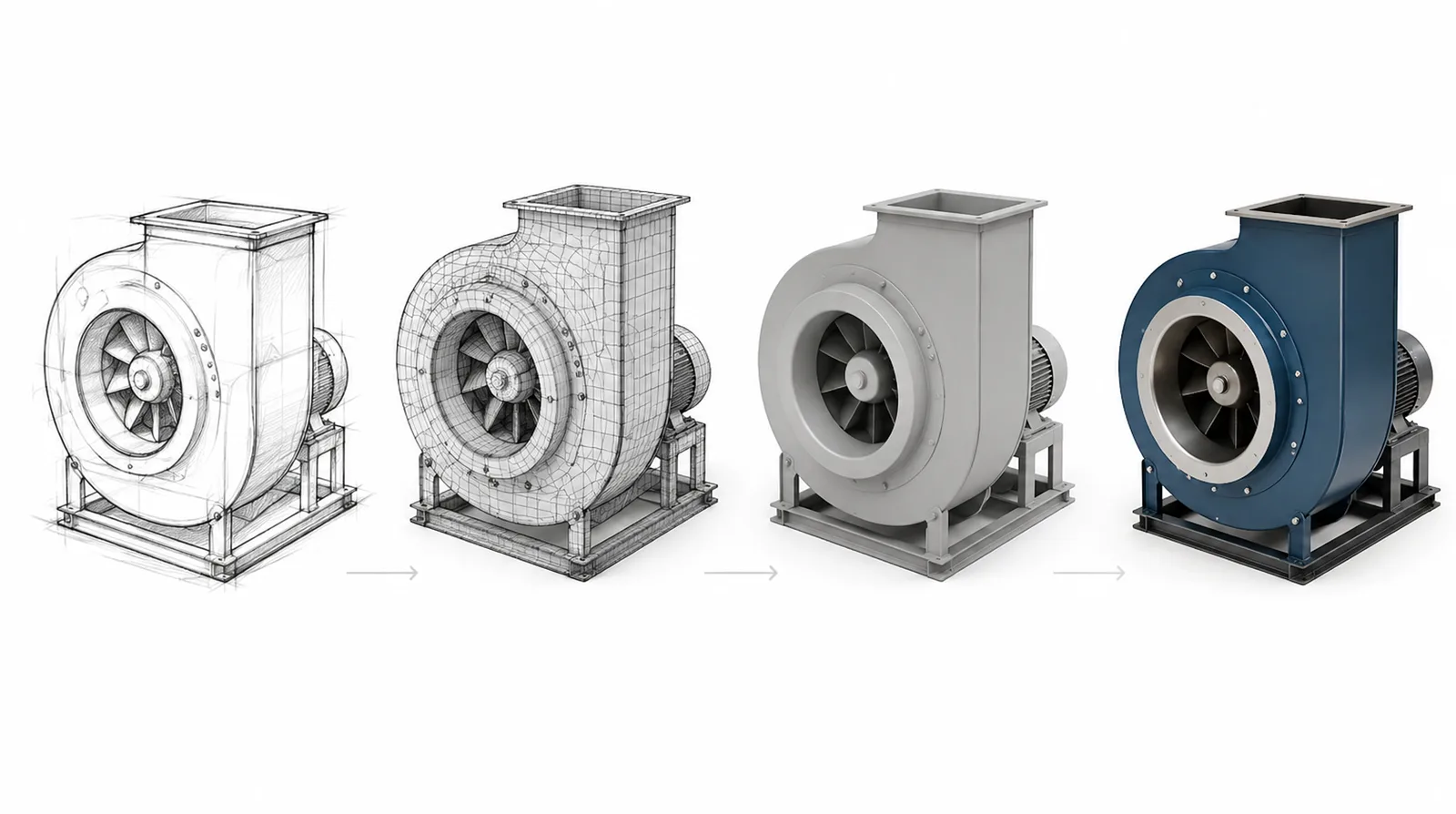
This is where most of the budget lives. The studio builds the 3D geometry, applies surface materials, and prepares the virtual scene that will host the animation.
With models, textures, and scene in place, animators choreograph motion: how the product moves, how virtual cameras frame each scene, how infographic elements appear, how cross-sections reveal internal mechanisms.
The critical deliverable here is the animatic — a low-resolution preview using simplified geometry. It shows timing, camera moves, and scene pacing. The animatic exists for one reason: to catch pacing and camera mistakes before final rendering, when fixes cost almost nothing. Once the animatic is approved, any further changes to motion or composition become expensive because they require re-rendering.
Rendering is where computers turn mathematical geometry into the photorealistic images you actually see. Each frame is calculated pixel by pixel, simulating how light physically bounces through the scene.
A single HD frame takes 5 minutes to 2 hours to render depending on scene complexity. A 30-second animation at 25 fps is 750 frames. Rendered on a single workstation, that's potentially weeks of compute time. Modelight uses infrastructure with 2,000+ processors available in parallel, which compresses weeks into a single overnight job.
These are the numbers behind why 3D animation takes longer than clients expect — and why it's worth it.
| Animation type | Duration | Production time |
|---|---|---|
| Product rotation loop | 10–15 s | 2–3 weeks |
| Product hero animation | 20–30 s | 3–5 weeks |
| Explainer video (medical, CNC) | 45–90 s | 5–8 weeks |
| Training / instructional animation | 2–5 min | 8–14 weeks |
| Machine assembly / process animation | 60–180 s | 6–12 weeks |
Occasionally a marketing director asks: "Why not just film the machine?" For some products — yes, absolutely. For most industrial B2B, 3D wins on three hard constraints that video production simply can't overcome.
90% of the friction in B2B 3D projects happens because of one misunderstanding: clients expect 3D to behave like video editing, where changes are cheap and iterative. It isn't. 3D animation behaves like architectural construction — cheap to change on paper, expensive to change once walls are up, prohibitive to change after the roof is on.
The animatic is the "blueprints approved" moment. Changes before the animatic cost minutes. Changes after final rendering can cost €300–€800 per 5-second camera change in additional render-farm time. Spend 30 minutes reviewing the animatic carefully; it will save you 30 hours of re-render time.
Working on a product launch? Bring us in during engineering, not after. We can build animations from preliminary CAD, which means your trade show reel is ready when the product is. Start a conversation →
A typical 30-second product animation takes 3–5 weeks from approved brief to delivery. Pre-production takes about a week; production (modeling, animation, test renders) takes 1.5–3 weeks depending on complexity; post-production (final rendering, editing, sound) takes 3–7 days. Complex machinery animations can take 6–12 weeks.
An animatic is a low-resolution preview of camera moves, timing, and scene composition using simplified geometry — produced before final rendering so the client can approve motion and pacing cheaply. The final animation applies full materials, lighting, and rendering. Changes at the animatic stage cost nothing; changes after final render require re-rendering frames, which can take days.
Every single frame of a 3D animation is calculated pixel-by-pixel by a computer, simulating how light bounces through the scene. A single HD frame can take 5 minutes to 2 hours of render time. A 30-second animation at 25 frames per second is 750 frames — which is why professional studios use cloud render farms with hundreds or thousands of processors in parallel to compress weeks of work into hours.
No — one of the biggest advantages of 3D animation is that it decouples marketing from physical production. You can create full product campaigns from CAD files alone, months before the first prototype is built. This is why many industrial manufacturers film animations for trade shows before the machine ships from the factory.
For best results: CAD files in STEP or native format (SolidWorks, Inventor, Creo), a brief with intended use and target audience, reference images showing the visual style you want, brand assets (logo vector, Pantone colors, fonts), and any existing technical or photographic documentation. A complete brief cuts production time by 30–50%.
Send CAD files and a short brief — we'll come back with a realistic timeline and quote in 24 hours.
Start a project